System Assembly Tool
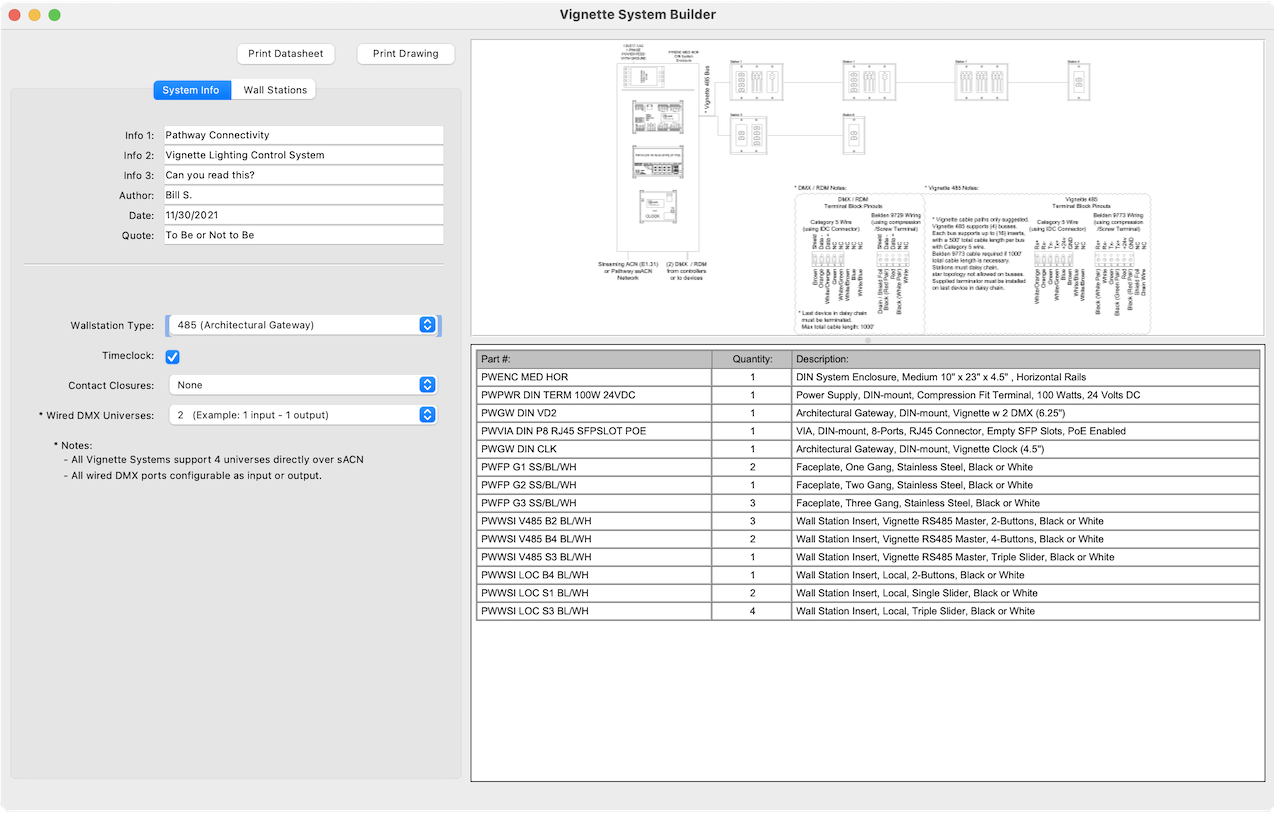
The System Assembly Tool is free software that helps you design lighting control systems without having CAD skills and without fear of getting the product nomenclature wrong. Choose from lists that only show you devices that fit the enclosure, wall station or inserts you choose. The software creates a drawing and lists all the products and quantities in the Bill of Materials (BOM). There is even a button to copy the full catalog number to your clipboard for use in other documents as you design your system.
Save time in planning your next dynamic lighting network by downloading the Pathway System Assembly Tool software below:

- Design a Lighting Control Enclosure with just a few clicks
- No CAD skills required
- Ensures you have the correct Enclosure size
- Creates a Bill of Materials to make ordering simple and complete
- Creates a PDF drawing of the cabinet and devices
- Lay out multi-gang Wall Stations
- Paste custom assembly nomenclature from Product Configurator and get an accurate PDF rendering in second
- Specify single or dual 1-gang data receptacles from a huge inventory of EtherCON, XLR3, 4 & 5-Pin male and female XLR connectors, with Compression Screw, ICD, RJ45 or Punchdown connectors on the rear. Silver, black or Stainless steel. The possibilities are almost endless!
Vignette System Builder
Use the Vignette System Builder to specify a complete Vignette houselight system, enclosures, including power supplies, gateways, switches, wall stations and faceplates. Label each station for pre-planning and instructional purposes for your installer. Create a Spec Sheet with full BOM or detailed drawings of the complete network.